1
New Task
In Progress
NullSpace · a native app for macOS
Your terminals, your Git, your AI agents and your plan, side by side on one infinite canvas — open where you left them, on the machine you left them on.Your terminals, your Git, your AI agents and your plan on one infinite canvas — right where you left them.
macOS 14+ · Apple silicon & Intel · free while it is in beta, paid after
The canvas — running in this page. Drag the board, move a window, type into the agent. — running in this page. The camera walks the board for you.
Explore all 23 surfaces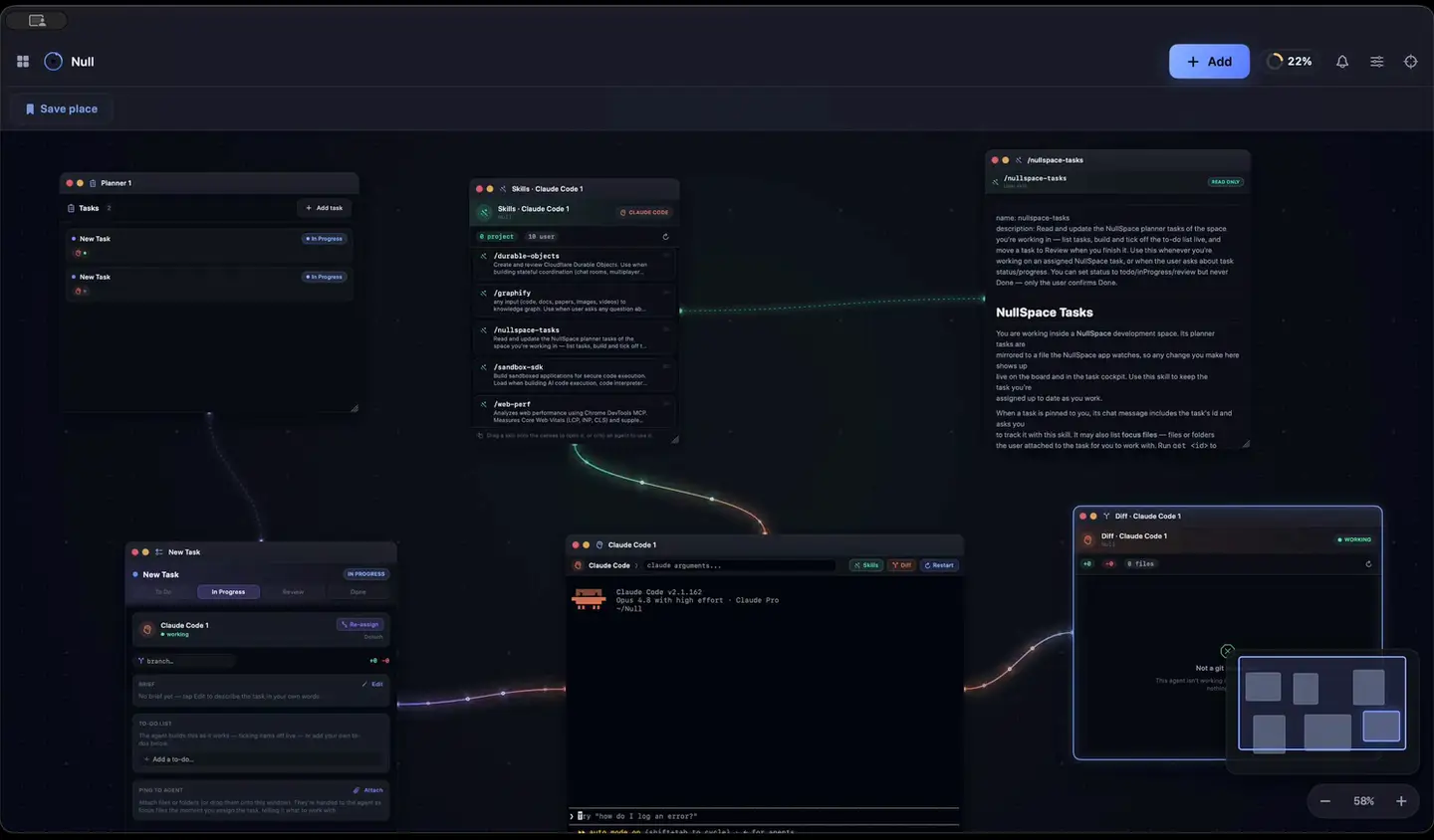
The board, playing itself
That was the real thing. Same canvas, same windows, same cables — now do it on your own repository.Now do it on your own repository.
Download for macOS Send the link to my MacA map, not tabs Pan and zoom the project like territory. Every window keeps the place you gave it.
Agents work in the open Claude Code runs as a window on the board — context, cache and burn rate in view. Type into it.
Cables make flow visible Planner to task, task to agent, git to repos. You read progress without opening a log.
Tile it when you need to ⌘⇧S frames what you're looking at as a stage — four agents side by side, no stacking.
Every surface is a focused native window that remembers its place on the board. Twenty-three in all — these are the ones you reach for first.
A real PTY running your login shell — ANSI colour, alt-screen TUIs, and scrollback that is still there tomorrow morning.
Claude Code, Codex, Gemini CLI and Copilot CLI, a window each, with model, context and burn rate on the title bar.
What the agent actually changed, per hunk, pulled straight out of the agent window and still wired to it.
Coloured lanes, ref badges, branch tools and remote actions — beside the terminal that caused them, not in another app.
Tasks that open as live cockpits, and hand themselves to an agent when you pull a cable across to it.
Quota rings and a real burndown, so the wall arrives on your schedule rather than in the middle of a refactor.
How much have I got left, and when does it come back? NullSpace answers it as an instrument rather than a percentage.
Claude, Codex and Copilot side by side. Nothing leaves the Mac.
An agent's turn outlives your attention span. The board you left running mirrors to a companion on your phone — no App Store, no second account.
Settings ▸ Phone shows a QR code. Scan it, add the page to your home screen, and it behaves like an app.
An agent's turn is much longer than your Mac's idle timer. Three things keep running with the canvas off screen — and all three read out and switch from one panel in the menu bar.
Stay Awake watches what is actually running — an agent mid-turn, a build, a download — holds the Mac up for exactly that long, then lets it sleep. It can hold through a closed lid, names what is keeping the machine up, and will not cook a hot Mac or drain a flat battery to finish a job.
Nightly triage, release prep, a sweep before you wake up. The loop starts the agent, holds the Mac awake for as long as it needs, and pushes the result to your phone.
State, a four-word summary and the switch, per lane. Click a lane and it unfolds into the full readout — timers, battery, temperature, fan and lid.
You talk, it types, you read it back — a keyboard with extra steps. NullSpace ships two layers instead: one that puts your words into any Mac app, and one you can argue with.
Dictation that isn’t trapped in our app. Hold ⌃⌥D anywhere on the Mac — Slack, Xcode, a browser field, someone else’s editor — and your speech lands at the caret. The model runs on your machine; no audio is uploaded.
The board itself, listening. Hold ⌃⌥ and say what you want — split the screen four ways, put an agent in each, wire the diff to the planner, tell me where my limits are. It does it, and says what it did.
Straight answer: NullVoice is yours today. NullAgent ships inside the app but is not switched on for accounts yet — it thinks and speaks through metered providers, and that door opens when billing is behind it. See what already shipped →
Sandboxed plugins you install from inside the app, each one running on-device: worktree isolation, several Claude logins, a planner an agent can drive, dictation everywhere, and a Mac that stays awake while there is work.
Give every AI agent its own copy of the working tree, so parallel agents never collide.
Keep several Claude Code logins side by side and switch the active one in a single click.
Let Claude Code read and drive the planner of the space it's working in — and keep you in control.
Talk instead of type — in Null Space, and in every other app on the Mac.
Your Mac stops sleeping through an agent's turn — and goes back to sleep the moment the work ends.
Included with the app while it is in beta.
Explore all five pluginsAn infinite space is the least self-explanatory interface there is, so the app teaches your copy of it — not a screenshot of somebody else's.
The tour reads your plan and the plugins actually installed on this Mac, then lays itself out from that — around forty stops across the space, your windows, agents, Git and planning. Walk away whenever: the shelf says Resume the tour and puts you back.
The pan gesture, a picker that only opens on right-click, a handle that has to be dragged — the panel offers Show me and does it once, in front of you.
Two questions worth a straight answer before you download anything.
We build a native app for a living rather than selling your work back to you — so the app is the thing you pay for. The full pricing page →
What changed and what it broke on the way, published in full rather than summarised into "bug fixes and improvements".
What an ADE actually is, what runs on it, and what it costs.
A native macOS app: an agentic development environment (ADE). Instead of stacking tabs and windows, you pin real terminals, a Git graph, diffs, AI agents, a planner and docs onto one infinite canvas that keeps its layout between sessions. An IDE organises files; an ADE organises the work around them — and runs it alongside your editor rather than replacing it.
Claude Code, Gemini CLI, GitHub Copilot CLI and OpenAI Codex, a window each. Assign a planner task to one by pulling a cable, then watch the work come back as a live diff you can stage.
Yes. Settings ▸ Phone shows a QR code; scanning it pairs a web companion you add to your home screen. It mirrors every agent window with its model and remaining context, pushes an alert when one finishes or asks a question, lets you type a reply straight back into that agent, and carries the same quota rings the desktop shows.
NullAgent is the voice layer: you talk, and it opens windows, spawns and briefs agents, draws cables and reads your limits back. It ships inside the app but is not switched on for accounts yet — it thinks and speaks through metered providers, and that waits on billing. What has already shipped is listed here.
Dictation is separate and available now: hold ⌃⌥D anywhere on the Mac and the text lands at the caret. Speech-to-text runs entirely on-device, so no audio leaves the machine.
No. Code, repositories, diffs, terminals, agent processes, layout, notes, planner and agent logins all stay on your machine, and dictation is transcribed locally. What reaches our server is the account, agent status for the phone, anything you type from the phone on its way to your Mac, crash reports and the feedback you send. The full list is on this page.
Nothing while it is in public beta — the whole app, every surface, every plugin, for an account and a confirmed email address.
After the beta it becomes a paid app on a subscription. You will know the price and the date well before either lands, and nothing is charged without you entering a card yourself. Pricing →
A native macOS app for macOS 14 Sonoma or newer, on Apple silicon and Intel. There is no Windows or Linux build today.
Still curious? The build is documented in the open on @NullSpaceCodes.
Free while it is in beta · macOS 14+ · Apple silicon & Intel · no card asked for
Not at your Mac? Null Space only runs on macOS. Leave an address and the link is there when you are.Null Space runs on macOS. Leave an address and the link will be waiting on your Mac.
One email with the link. No newsletter, no list-selling, unsubscribe by ignoring it.
NullSpace is a macOS app, free while it is in public beta. Leave an address and you get one email with the download link — nothing else, ever.
…or just download it now — it takes about twenty seconds.